How to Write Good Alt Text for SBI Images: Complete Guide for Solo Build It! Users
Want your SBI website to rank higher, load faster, and be truly accessible? Mastering alt text for your images is one of the smartest moves you can make. But doing it manually — especially while fighting SBI’s strict 100KB image limit — is time-consuming. That’s exactly why thousands of SBI members now rely on Bulk Snap from SBISnap.com to handle image optimization effortlessly.
In this comprehensive guide, you’ll learn everything about writing powerful alt text, plus how Bulk Snap automates the entire process so you can focus on growing your business instead of wrestling with images.
Why Alt Text is a Game-Changer for Your SBI Site
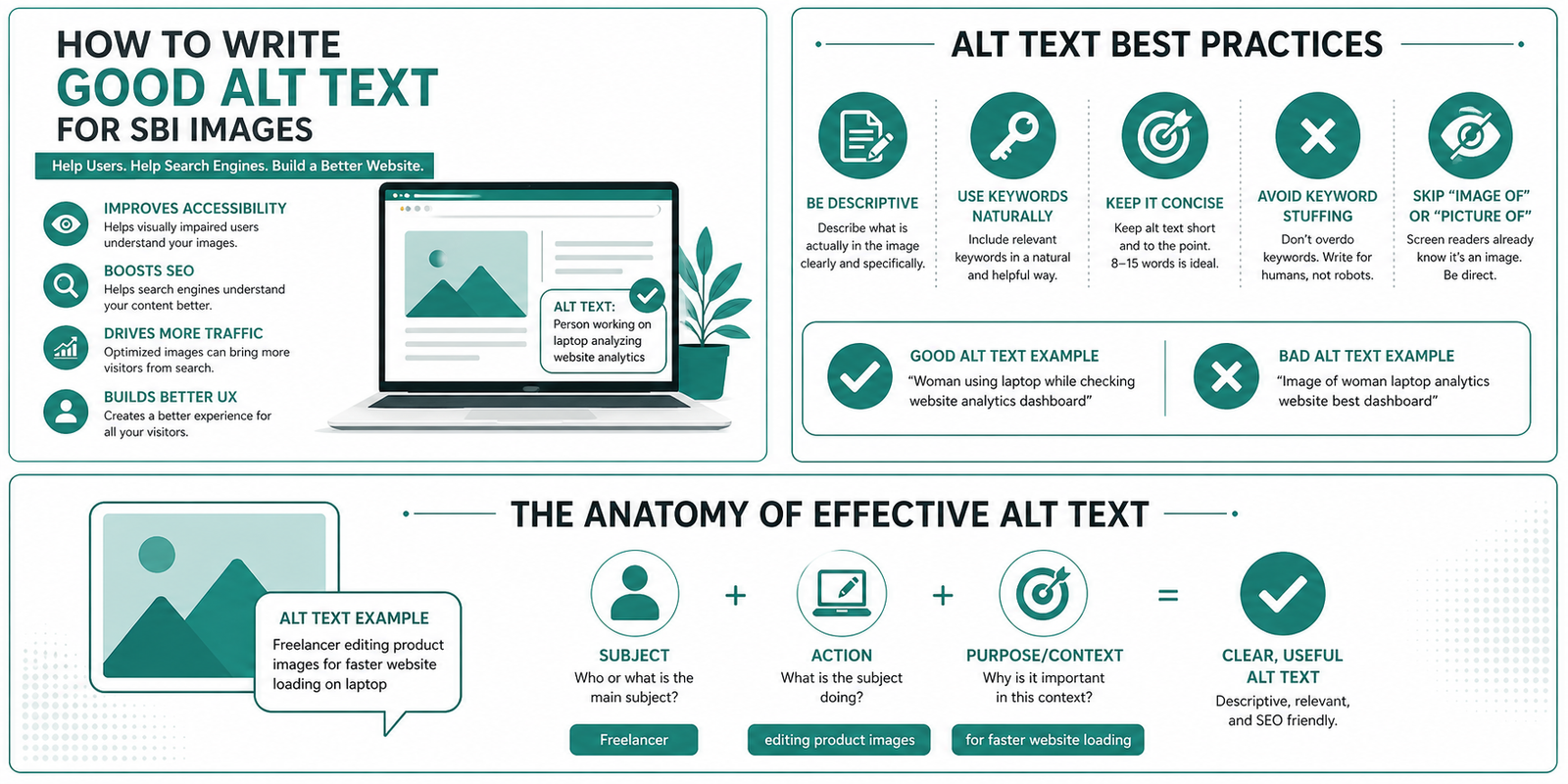
Alt text (alternative text) is a short description added to every image on your website. It serves three critical purposes:
- Accessibility: Screen readers read alt text aloud to visually impaired users.
- SEO: Google and other search engines use alt text to understand image content and rank your pages better in image search and web search.
- User Experience: When images fail to load (slow connections, mobile data issues), visitors still understand what the image shows.
For Solo Build It! users, great alt text combined with properly sized images can dramatically improve page speed scores, user engagement, and search rankings — all while making your site more inclusive.
Here’s the reality: Most SBI users upload images one by one, manually resize them under 100KB, rename files, and then try to write decent alt text. It’s exhausting. Bulk Snap from SBISnap.com eliminates all that pain by processing hundreds of images in minutes with smart AI.
Understanding the Basics of Alt Text
Alt text is added in HTML like this:
<img src="pasta-carbonara.jpg" alt="Creamy homemade Italian pasta carbonara with fresh parsley" />In the SBI Image Library and page editor, you get the chance to add this description when uploading or editing images. Search engines and accessibility tools read this text even if they can’t “see” the picture.
Rules for Writing Excellent Alt Text (With Real Examples)
1. Be Specific & Descriptive
Bad: “Dog”
Good: “Happy golden retriever running on the beach at sunset with waves crashing behind”
2. Keep It Short (Under 125 Characters Ideal)
Screen readers stop after a certain length. Focus on the most important details that support your content.
3. Include Target Keywords Naturally
For an SBI site about “low carb recipes”, use: “Grilled salmon with asparagus and avocado on white plate – low carb keto dinner recipe”
4. Match the Context of Your Page
The same image can have different alt text depending on the article. Always ask: “What does this image add to this specific page?”
5. Don’t Keyword Stuff
Write for humans first. Natural, helpful descriptions perform better and avoid penalties.
Common Alt Text Mistakes SBI Users Make
- Leaving alt text blank
- Using generic filenames like “IMG_0456.jpg” as alt text
- Starting with “Image of” or “Photo of” (screen readers already announce it’s an image)
- Copy-pasting the same alt text for multiple different images
- Making it too long or too promotional
- Ignoring decorative images (these should have empty alt="")
Bulk Snap’s AI avoids all these mistakes automatically by understanding your page topic and generating context-aware descriptions.
Alt Text Strategies for Different Image Types
Product & Food Photography
“Freshly baked chocolate chip cookies on cooling rack with melted chocolate chips visible – perfect homemade cookie recipe”
Travel & Lifestyle Images
“Tourist standing on viewpoint overlooking the Grand Canyon at golden hour – best photography spots guide”
Infographics & Charts
“Infographic showing top 10 traffic sources for SBI websites in 2025 with percentages”
Screenshots & Step-by-Step Tutorials
“Step 4: Clicking the blue Publish button in the SBI BlockBuilder editor”
Logos & Icons
“Solo Build It logo” or “Green checkmark icon representing verified tip”
How Bulk Snap from SBISnap.com Makes Everything Easy
Bulk Snap is the ultimate image optimization tool built specifically for Solo Build It! members. Here’s what it does for you:
- AI-Powered Alt Text Generation: Upload your images and page topic once. The AI creates unique, SEO-friendly, accessible alt text for every single image.
- Automatic Compression to Under 100KB: Perfectly sized for SBI Image Library without visible quality loss.
- Smart SEO Filenames: Automatically renames files like “DSC_1234.jpg” to “best-keto-pizza-recipe-with-cauliflower-crust.jpg”.
- Bulk Processing: Handle 50, 100, or even 500 images at once instead of SBI’s slow one-by-one upload.
- One-Click Ready Files: Download a zip file ready to upload directly into your SBI account.
Users report saving 5–10 hours per large content project. Instead of spending an afternoon on images, you finish in minutes and move on to writing high-quality content that actually ranks.
Real SBI User Results
“Bulk Snap cut my image processing time from 3 hours to 12 minutes. The alt text is better than what I would write manually!”
— Priya Sharma, Health & Fitness SBI Site Owner
Step-by-Step Manual Method (For When You Need Full Control)
- Examine the image carefully – note subject, action, setting, colors, and emotion.
- Understand page context – what is the main keyword and goal of this article?
- Draft the description – make it natural and informative.
- Optimize length and keywords – refine to under 125 characters.
- Test it – read it aloud or use free accessibility checkers.
Even when doing it manually, you can use Bulk Snap first to generate strong drafts and then customize them.
Advanced Image Optimization Tips for SBI Success
Beyond alt text, combine these strategies:
- Use descriptive yet short file names (Bulk Snap does this automatically).
- Always compress images to under 100KB before uploading to SBI.
- Add relevant captions where appropriate.
- Place images near related text content.
- Monitor image performance in Google Search Console.
When you use Bulk Snap, all these best practices are handled together in one smooth workflow designed exclusively for the Solo Build It! platform.
Measuring the Impact of Better Alt Text & Images
After implementing optimized images and alt text you should see:
- Faster page load times
- Higher rankings in Google Image Search
- Better overall SEO performance
- Improved accessibility scores
- Lower bounce rates
Many SBI members report noticeable traffic increases within weeks of properly optimizing their image libraries.
Stop Struggling With Images – Let Bulk Snap Do the Heavy Lifting
You became an SBI user to build a profitable online business — not to waste hours resizing photos and writing alt text. Bulk Snap from SBISnap.com was created to solve exactly this problem for dedicated Solo Build It! members.
With Bulk Snap you get:
- Lightning-fast bulk processing
- Intelligent AI alt text tailored to your niche
- Perfect SBI-compliant file sizes
- Professional SEO filenames
- More time to focus on content and marketing
Ready to transform how you handle images on your SBI site?
Try Bulk Snap at SBISnap.com Today
Final Thoughts
Writing good alt text is both an accessibility requirement and a powerful SEO opportunity. When done correctly, it helps every visitor — sighted or not — while giving your SBI pages an edge in search rankings.
Don’t let image optimization slow you down. Use the power of Bulk Snap from SBISnap.com to automate the tedious work and elevate the quality of every image on your Solo Build It! website.
Your future self (and your traffic numbers) will thank you.