Organize Bulk Website Image Preparation for Solo Build It: Streamline Your Workflow in 2026
Feeling overwhelmed trying to organize and prepare hundreds of images for your Solo Build It website? From collecting raw photos, resizing them, compressing under 100KB, creating SEO filenames, writing alt text, to fighting the 10-image upload limit — bulk image preparation can easily turn into a chaotic, time-consuming nightmare that kills your publishing momentum.
In this complete guide, you’ll learn how to effectively **organize bulk website image preparation** for Solo Build It. Discover practical systems and strategies that bring order to the chaos. Most importantly, see how Bulk Snap from SBISnap.com — the ultimate AI-powered bulk image optimization tool built exclusively for Solo Build It users — transforms disorganized image chaos into a smooth, efficient, and professional workflow, handling everything automatically so you can focus on creating great content.
Why Organizing Bulk Image Preparation Is Crucial for SBI Success
When you publish regularly on Solo Build It, image preparation becomes one of the biggest bottlenecks. Without a proper system, you end up with scattered files, inconsistent quality, missed SEO opportunities, and wasted hours. Good organization leads to:
- Faster publishing cycles
- Consistent professional image quality
- Better SEO through optimized filenames and alt text
- Reduced stress and creative burnout
- Scalable workflow as your site grows
The Organized Way with Bulk Snap: Clean, automated bulk preparation in minutes with perfect results.
Common Problems When Handling Bulk Images in Solo Build It
1. Disorganized Raw Files
Scattered photos across different folders make it hard to track what belongs where.
2. Inefficient Preparation Workflow
Jumping between multiple tools for compression, renaming, and alt text.
3. The 10-Image Upload Limit
Forces repetitive uploading sessions for large batches.
4. Inconsistent Optimization
Some images look great, others are blurry or oversized.
5. Missing SEO Elements
Generic filenames and weak or missing alt text.
How Bulk Snap Helps You Organize Bulk Website Image Preparation
Bulk Snap from SBISnap.com is the complete solution designed specifically for Solo Build It users who need to handle bulk images efficiently. It brings order and intelligence to the entire preparation process.
Key Organization & Optimization Features:
- Bulk Upload & Processing: Handle hundreds of images in one organized session
- Intelligent 100KB Compression: Automatically creates lightweight, high-quality images
- AI SEO Filename Generator: Creates descriptive, keyword-rich names based on context
- Smart Alt Text Creation: Generates natural, relevant descriptions
- Clean Export System: Delivers well-organized, ready-to-upload files
Step-by-Step: How to Organize Bulk Image Preparation with Bulk Snap
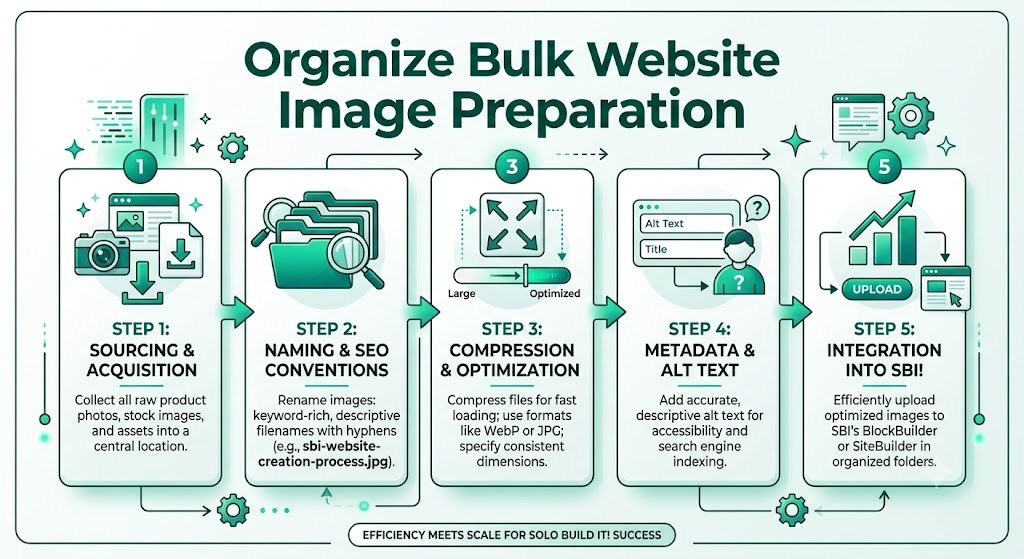
- Organize Raw Images: Create dedicated folders for each article or project.
- Upload to Bulk Snap: Visit SBISnap.com and upload your entire batch.
- Provide Page Context: Enter article title or keywords once.
- Run Bulk Optimization: Select the SBI Image Library preset.
- Process Efficiently: AI handles compression, resizing, naming, and alt text.
- Download Organized Package: Get clean, labeled files ready for upload.
- Upload to SBI: Import in smooth, efficient batches.
This organized workflow turns hours of chaos into minutes of calm efficiency.
Real Results: Organized & Faster Image Preparation
Success Story
“Organizing and preparing bulk images used to be my biggest headache. Bulk Snap completely changed that. I upload raw photos, set context once, and everything comes back perfectly optimized and organized. My publishing speed has doubled and my site looks far more professional.”
— Ankit Verma, Multi-Niche SBI Site Owner
Advanced Tips for Organized Bulk Image Preparation
- Create a standard folder structure (Raw → Optimized → Uploaded)
- Process images immediately after content drafting
- Use Bulk Snap presets for different content types
- Regularly clean and re-optimize older images
- Keep backups of both raw and optimized versions
Comparison: Chaotic vs Organized Bulk Preparation
| Aspect | Chaotic Manual Method | Organized with Bulk Snap |
|---|---|---|
| Time per Article | 2–4+ hours | 8–15 minutes |
| Organization Level | Low & Chaotic | High & Professional |
| Consistency | Variable | Excellent |
| SEO Quality | Basic | High |
Conclusion: Build an Organized, Efficient Image System
Learning how to organize bulk website image preparation is one of the smartest investments you can make as a Solo Build It user. A well-organized system saves time, improves quality, reduces stress, and helps you publish more consistently.
Bulk Snap from SBISnap.com makes organizing bulk image preparation effortless and highly effective. It brings together powerful bulk processing, intelligent compression under 100KB, AI-generated SEO filenames, smart alt text, and clean export organization — all in one tool designed specifically for Solo Build It users.
Stop letting disorganized images slow you down. Start building a faster, cleaner, and more professional workflow with Bulk Snap today.
Ready to organize your bulk image preparation? Visit SBISnap.com now and experience the easiest way to optimize images for Solo Build It.