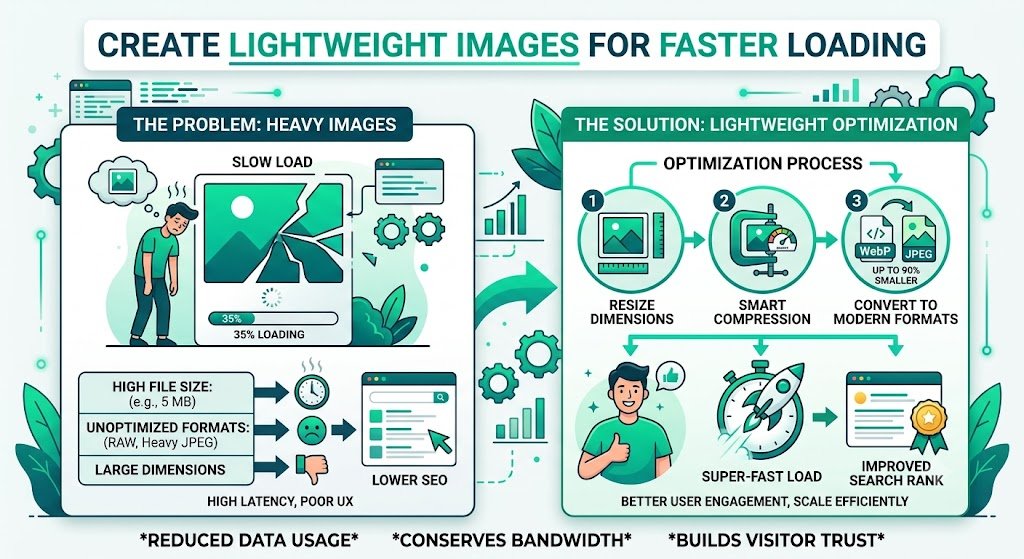
Create Lightweight Images for Faster Loading in Solo Build It: The Ultimate Guide
Want your Solo Build It website to load blazing fast and rank higher in Google? Heavy, unoptimized images are one of the biggest speed killers on most SBI sites. Even though Solo Build It enforces a 100KB limit, many users still struggle to create truly lightweight images that maintain beautiful quality while delivering excellent performance.
In this comprehensive guide, you’ll learn proven strategies to create lightweight images for faster loading on your Solo Build It website. Most importantly, discover how Bulk Snap from SBISnap.com — the smartest AI-powered bulk image optimization tool built exclusively for Solo Build It users — makes creating lightweight, high-performing images effortless by automating compression, resizing, SEO filenames, and alt text generation in minutes.
Why Lightweight Images Are Essential for Solo Build It Success
Website speed is a major ranking factor in 2026. Google’s Core Web Vitals reward fast-loading sites, and images are often the heaviest elements on any page. Creating lightweight images helps you:
- Achieve higher PageSpeed scores
- Reduce bounce rates and improve user experience
- Rank better in both web and image search
- Provide excellent mobile performance
- Avoid upload rejections and timeouts in SBI
Lightweight doesn’t mean low quality. With the right techniques and tools, you can have beautiful visuals that load in under 2 seconds.
The Smart Solution: Bulk Snap automatically creates perfectly lightweight images optimized for Solo Build It.
Common Mistakes That Prevent Lightweight Images in SBI
- Uploading raw high-resolution photos directly
- Using heavy compression that ruins visual quality
- Ignoring proper dimensions and aspect ratios
- Not using modern formats like WebP
- Skipping batch optimization for large articles
The Best Way to Create Lightweight Images for SBI
Bulk Snap from SBISnap.com is the most effective tool for Solo Build It users who want truly lightweight images without compromising quality. It uses intelligent AI to deliver optimal results every time.
Key Features for Lightweight Image Creation:
- Advanced AI Compression: Creates lightweight files under 100KB while preserving sharpness and color
- Smart Dimension Optimization: Automatically resizes images to ideal SBI dimensions
- Bulk Processing: Turn hundreds of heavy photos into lightweight assets in minutes
- AI SEO Enhancements: Generates descriptive filenames and alt text automatically
- Consistent Quality: Professional results across all images in your article
Step-by-Step: How to Create Lightweight Images with Bulk Snap
- Collect Your Images: Gather all raw, high-resolution photos for your article in one folder.
- Upload to Bulk Snap: Visit SBISnap.com and upload your entire batch.
- Provide Page Context: Enter your article title or main keywords.
- Select Lightweight Preset: Choose the “SBI – Maximum Speed & Lightweight” setting.
- Process: Let the AI compress, resize, and optimize all images to be lightweight and fast-loading.
- Download: Receive perfectly optimized, lightweight images ready for SBI.
- Upload to SBI: Import with confidence and enjoy a noticeably faster website.
This complete workflow typically takes just 8–15 minutes, even for image-heavy articles.
Real Results: Faster Loading SBI Websites
Success Story
“After switching to Bulk Snap, all my images became truly lightweight. My SBI site’s average load time dropped from 5.8 seconds to 1.7 seconds. PageSpeed score jumped to 96 on mobile. The quality is still excellent. This tool is a must-have for anyone serious about SBI performance!”
— Amit Verma, Finance Niche SBI Site Owner
Advanced Tips for Creating Lightweight Images
- Aim for 70–90KB for most content images
- Use progressive JPEGs for faster perceived loading
- Enable lazy loading in SBI settings
- Regularly audit and re-optimize older heavy images
- Combine lightweight images with good caching and CDN
Lightweight Images vs Heavy Images: The Impact
| Metric | Heavy Images | Lightweight Images (Bulk Snap) |
|---|---|---|
| Average Load Time | 4–8 seconds | 1.5–2.5 seconds |
| PageSpeed Score (Mobile) | 45–65 | 85–98 |
| Bounce Rate | Higher | Significantly Lower |
Why Bulk Snap is the Best Tool for Lightweight Images in SBI
Unlike basic compressors or manual methods, Bulk Snap was built specifically for Solo Build It. It delivers truly lightweight images that meet the 100KB limit while looking professional and contributing to your SEO goals.
Start Creating Lightweight Images with Bulk Snap Today →
Conclusion: Build a Faster, Better Solo Build It Website
Creating lightweight images is one of the most effective ways to improve your Solo Build It website’s speed, user experience, and search rankings. While manual optimization is possible, it’s slow, inconsistent, and frustrating for active creators.
Bulk Snap from SBISnap.com makes creating lightweight images effortless. It intelligently compresses, resizes, renames, and optimizes your photos to be fast-loading and perfectly suited for the SBI Image Library — all while generating SEO filenames and alt text automatically.
Stop accepting slow load times caused by heavy images. Start using Bulk Snap today and give your Solo Build It website the performance edge it deserves. Your visitors will stay longer, Google will rank you higher, and you’ll save hours every week.
Ready to create truly lightweight images for faster loading? Visit SBISnap.com now and experience the easiest, most effective way to optimize images for Solo Build It.