Batch Resize and Rename Images for SBI: The Complete Guide for Solo Build It Users
Struggling with batch resizing and renaming dozens or hundreds of images for your Solo Build It website? You’re not alone. Most SBI users waste hours manually resizing images to under 100KB, renaming them with SEO-friendly names, and preparing them for upload — only to repeat the process for every new article.
In this comprehensive guide, discover the smartest ways to batch resize and rename images for SBI. Most importantly, learn how Bulk Snap from SBISnap.com completely transforms this tedious task into a fast, automated process — delivering perfectly optimized images ready for the SBI Image Library in minutes.
Why Batch Resize and Rename Matters for Solo Build It Success
Solo Build It has strict requirements: every image must be under 100KB, properly sized, and ideally have descriptive filenames. When publishing content-rich articles with 30–100+ images, doing this one image at a time is extremely inefficient and frustrating.
Proper batch processing delivers:
- Faster website loading speeds
- Better SEO through keyword-rich filenames
- Consistent image quality across articles
- Reduced upload rejections in SBI
- More time for actual content creation
Manual batch processing is possible but painful. This is where a dedicated tool like Bulk Snap becomes a game-changer.
Bulk Snap Reality: AI-powered batch resize + rename + optimization in minutes — all tailored for SBI.
Challenges SBI Users Face with Image Processing
- Raw images from phones/cameras are often 3–15MB each
- Need to resize hundreds of images to ideal dimensions
- Creating unique, SEO-friendly filenames manually is exhausting
- Ensuring every file stays under 100KB
- Maintaining consistency across large batches
- Limited time and patience for repetitive tasks
Manual Methods for Batch Resize and Rename
1. Using Bulk Image Tools
Tools like XnConvert, IrfanView, or Photoshop Actions can help with batch resizing. However, renaming still requires separate steps and doesn’t generate SEO-optimized names.
2. Online Batch Tools
Websites like ILoveIMG or TinyJPG allow batch compression, but they lack intelligent renaming and SBI-specific optimization.
3. Command Line / Scripts
Advanced users may use ImageMagick, but this requires technical knowledge and still doesn’t handle smart SEO naming.
All these methods are partial solutions. None of them fully solve the complete workflow SBI users need.
Introducing Bulk Snap: The Ultimate Batch Resize & Rename Tool for SBI
Bulk Snap from SBISnap.com is a powerful, AI-driven image optimization platform built exclusively for Solo Build It users. It handles batch resizing, intelligent renaming, compression, and more — all in one simple workflow.
Powerful Features of Bulk Snap:
- Smart Batch Resizing: Automatically resizes hundreds of images to SBI-recommended dimensions while preserving quality.
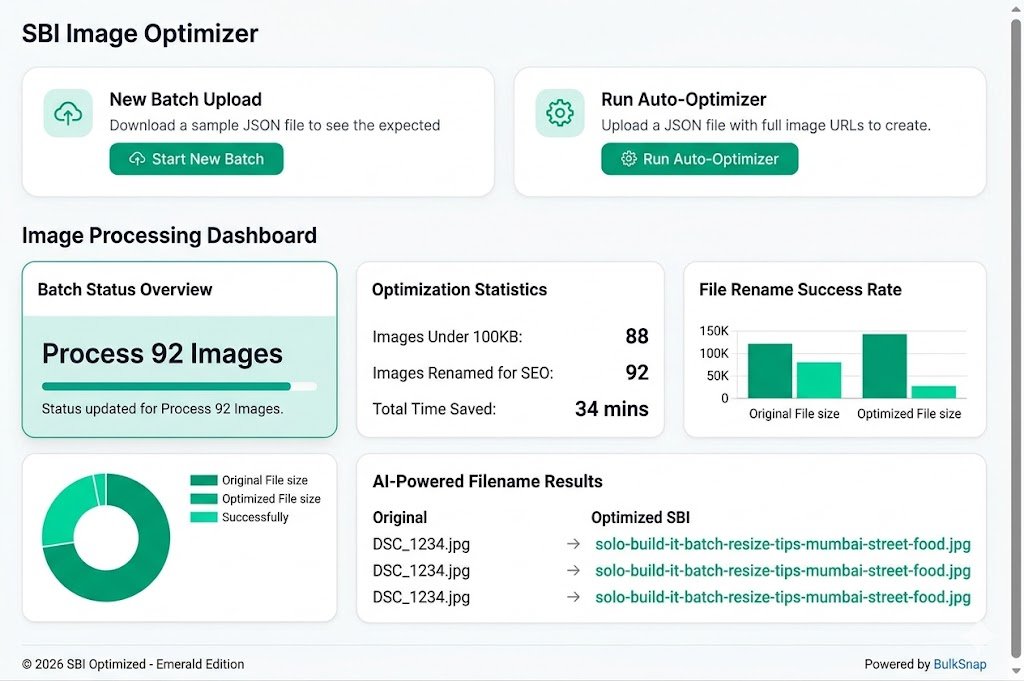
- AI SEO Renaming: Converts generic names like DSC_1234.jpg into powerful SEO filenames like “best-indian-street-food-recipes-mumbai-vada-pav.jpg”.
- Guaranteed Under 100KB Compression: Intelligent compression that meets SBI limits without visible quality loss.
- Context-Aware Processing: Enter your article topic once and the AI optimizes filenames and alt text accordingly.
- Bulk Alt Text Generation: Creates descriptive, SEO-friendly alt text automatically.
- One-Click Export: Downloads a clean zip file ready for SBI upload.
Real Results from SBI Users
“I needed to batch resize and rename 92 images for my new SBI article. Bulk Snap completed everything in under 8 minutes. All files under 95KB with excellent SEO filenames. This tool has become essential for my workflow!”
— Rohan Kapoor, Finance Niche SBI Site Owner
Step-by-Step: Batch Resize and Rename Images for SBI Using Bulk Snap
- Prepare Your Images: Collect all raw images for your article into one folder.
- Upload to Bulk Snap: Visit SBISnap.com and drag & drop your entire batch.
- Set Article Context: Enter your page title or main keyword (e.g., “Low Carb Indian Recipes 2026”).
- Choose SBI Preset: Select the optimized setting for Solo Build It (under 100KB).
- Process the Batch: Click start — AI handles resizing, compression, renaming, and alt text generation.
- Review Results: Quickly preview optimized images and filenames.
- Download Ready Files: Get a perfectly organized zip file.
- Upload to SBI: Import your optimized images into the Image Library.
Total time: Usually 5–12 minutes, even for large batches.
Best Practices for Batch Image Processing in SBI
Recommended Dimensions
- Featured Images: 1200–1400px wide
- In-Content Images: 700–900px wide
- Small Graphics: 400–600px
SEO Filename Formula
Primary Keyword + Descriptive Terms + Benefit/Location (if relevant). Bulk Snap follows this intelligently.
Pro Tips
- Process images article-by-article for best AI context accuracy
- Keep original raw files as backup
- Use consistent branding in filenames across your site
- Regularly batch optimize older images in your library
Beyond Resize & Rename: Complete Image Optimization
Bulk Snap doesn’t stop at resizing and renaming. It delivers a full optimization package:
- Smart compression algorithms
- Proper file format handling
- Accessibility-friendly alt text
- Consistent quality across all images
Measuring Success After Batch Optimization
After implementing batch resize and rename with Bulk Snap, track:
- PageSpeed Insights scores
- Image-related search traffic in Google Search Console
- Upload success rate in SBI
- Time saved per article
- Overall site performance improvements
Users typically see faster load times, better rankings, and significantly reduced workload.
Why Bulk Snap Stands Out for SBI Users
Unlike generic batch tools, Bulk Snap was created by understanding the exact pain points of Solo Build It members. It combines powerful AI with deep platform knowledge to deliver results that generic tools simply cannot match.
Whether you publish weekly or create massive guides, Bulk Snap scales with your needs and consistently saves hours every week.
Start Batch Resizing & Renaming Your SBI Images Today →
Conclusion: Transform Your SBI Image Workflow Forever
Batch resizing and renaming images for Solo Build It doesn’t have to be a time-consuming chore. While manual methods exist, they simply don’t make sense for ambitious SBI users who want to publish high-quality content consistently and efficiently.
Bulk Snap from SBISnap.com is the complete, intelligent solution that handles batch resize, smart renaming, compression to under 100KB, alt text generation, and full preparation — all in one easy-to-use tool designed exclusively for Solo Build It.
Stop struggling with repetitive image tasks. Reclaim your valuable time and focus on what truly matters — creating content that grows your online business.
Ready to experience effortless batch image processing? Visit SBISnap.com today and take your Solo Build It workflow to the next level.